
Tiny Desk AI
Best Photos for Tiny Desk AI: Framing, Clothes and Group Crops
Prepare Tiny Desk AI photos with the right size, framing, light and clothes. Learn how to crop a group photo and choose inputs for the singer, sax and keyboard seats.
Updated
The best Tiny Desk AI input is a sharp photo of one consenting adult, with the face visible and roughly facing the camera, even lighting and the upper body in view. Pick the clothes you want in the result. Better input makes the person easier to recognize, but it cannot guarantee an exact face, outfit or expression throughout the moving video.
Check the file before choosing the picture
| Requirement | What to check |
|---|---|
| Format | JPEG, PNG or WebP; changing a filename does not convert a file |
| File size | Up to 10 MB per photo |
| Dimensions | Each side must be 301–5,760 pixels |
| Shape | Width divided by height must be greater than 0.4 and less than 2.5; the endpoints are excluded |
| People | One adult per image, one separate photo per seat |
| Permission | Yourself or an adult who agreed; no public figures, minors, pets or cartoons |
A screenshot of a tiny face may pass the file-size check but still be a poor identity input. Enlarging a blurred image does not restore facial detail. Select a sharper original instead.
What to look for in a photo
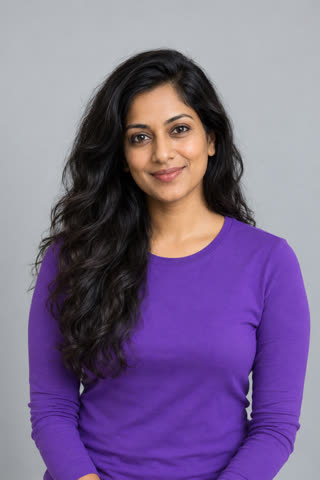
This photo is used in our public examples. Look for the same useful details in your own photo: an unobstructed face, clearly visible upper-body clothing and a simple background. The purple top gives the model a clear clothing reference. Your video will use the fixed concert stage rather than the photo's background.
Choose for the seat, not just the nicest selfie
| Seat | Prioritize | Why it matters |
|---|---|---|
| Photo 1: lead singer | The clearest face, unobstructed eyes and a roughly front-facing view | The close-up includes a wave and a head-back laugh, where likeness can drift |
| Photo 2: sax player | A recognizable face, hair and upper-body clothing | The instrument crosses the mouth area |
| Photo 3: keyboard player | Clear upper-body shape and clothing | This person appears smaller in the opening band shot |
Waist-up framing usually gives more useful clothing and body information than an extreme face crop. Avoid sunglasses, masks, hands over the face, strong beauty filters and harsh shadows. More than three featured people cannot be added; the other musicians are generated by AI.
Can I use a group photo?
You can start with a group photo only if you crop it into separate pictures, one person in each. Get everyone's agreement first. For every crop:
- Remove other faces and leave enough of the intended person's upper body.
- Check that the face is still sharp at ordinary viewing size.
- Verify both sides remain at least 301 pixels and the shape stays within the limits above.
- Save as an accepted format and upload each crop to the correct seat.
If a useful crop is too small, ask for a separate original photo. Do not upload the same photo into two seats. The Solo, Duo and Trio guide explains the fixed order.
Questions about the result
Do the clothes come from my photo? The model is instructed to follow them, along with the person's appearance. Small clothing details can change; choose recognizable shapes and colors rather than relying on tiny lettering.
Does the background matter? A simple background makes the input easier to read, but the video uses the fixed desk-concert setting.
Does a face mismatch mean I get a free retry? No automatic free rerender is promised for an unsatisfactory likeness. A new video uses a credit. See troubleshooting before trying again.